好的,根据论坛资料,STC官方社区有非常成熟的ST7735驱动方案。下面我为您整理一份可直接使用的适配代码。
STC单片机驱动1.8寸ST7735 LCD适配代码
以下代码基于 STC8H8K64U / STC32G12K128 / Ai8051U 系列,使用 SPI接口 驱动1.8寸ST7735彩屏(128×160分辨率)。
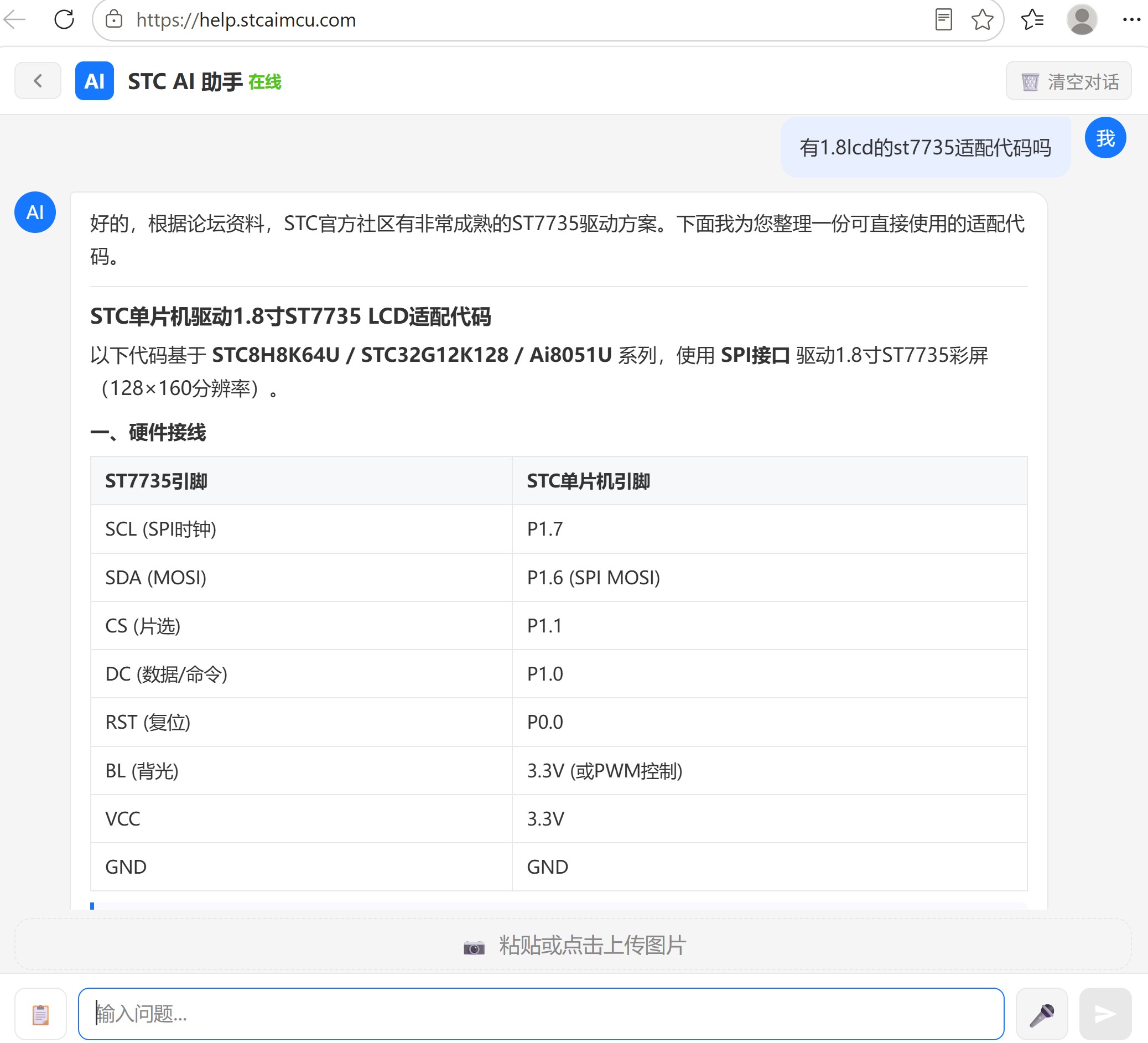
一、硬件接线
| ST7735引脚 |
STC单片机引脚 |
| SCL (SPI时钟) |
P1.7 |
| SDA (MOSI) |
P1.6 (SPI MOSI) |
| CS (片选) |
P1.1 |
| DC (数据/命令) |
P1.0 |
| RST (复位) |
P0.0 |
| BL (背光) |
3.3V (或PWM控制) |
| VCC |
3.3V |
| GND |
GND |
注意:ST7735的IO电压最高为3.6V,不能直接接5V,需使用3.3V供电。如果使用5V单片机,需加电平转换或串联限流电阻。
二、完整驱动代码
文件1:lcd.h
#ifndef __LCD_H__
#define __LCD_H__

//========================================================================
// 文件: lcd.h
// 描述: ST7735 1.8寸 TFT LCD 驱动头文件
// 适用: STC8H8K64U / STC32G12K128 / Ai8051U 系列
// 接口: 4线SPI
// 分辨率: 128x160
// 晶振: 建议使用内部IRC 40MHz或外部晶振
//========================================================================

// 颜色定义
#define BLACK     0x0000
#define BLUE      0x001F
#define RED       0xF800
#define GREEN     0x07E0
#define CYAN      0x07FF
#define MAGENTA   0xF81F
#define YELLOW    0xFFE0
#define WHITE     0xFFFF

// 屏幕方向定义
#define LANDSCAPE     0
#define PORTRAIT      1

// 屏幕参数
#define LCD_WIDTH     128
#define LCD_HEIGHT    160

//========================================================================
// 函数声明
//========================================================================
void LCD_Init(void);
void LCD_SetWindow(unsigned char x0, unsigned char y0, unsigned char x1, unsigned char y1);
void LCD_WriteData_16bit(unsigned int color);
void LCD_Fill(unsigned char x0, unsigned char y0, unsigned char x1, unsigned char y1, unsigned int color);
void LCD_Clear(unsigned int color);
void LCD_DrawPoint(unsigned char x, unsigned char y, unsigned int color);
void LCD_Display(void);

#endif
文件2:lcd.c
//========================================================================
// 文件: lcd.c
// 描述: ST7735 1.8寸 TFT LCD 驱动实现
// 适用: STC8H8K64U / STC32G12K128 / Ai8051U 系列
// 接口: 4线SPI (软件SPI,方便移植)
// 分辨率: 128x160
// 晶振: 40MHz
//========================================================================

#include "lcd.h"
#include "intrins.h"

//========================================================================
// 引脚定义(可根据实际接线修改)
//========================================================================
sbit LCD_CS   = P1^1;    // 片选
sbit LCD_DC   = P1^0;    // 数据/命令 (1=数据, 0=命令)
sbit LCD_RST  = P0^0;    // 复位
sbit LCD_SCL  = P1^7;    // SPI时钟
sbit LCD_SDA  = P1^6;    // SPI数据(MOSI)

//========================================================================
// 微秒级延时函数(基于软件延时,需根据主频调整)
// 以下为40MHz主频下的近似延时
//========================================================================
static void delay_us(unsigned int us)
{
    unsigned int i, j;
    for(i = 0; i < us; i++)
    {
        for(j = 0; j < 10; j++);    // 40MHz下约1us
    }
}

static void delay_ms(unsigned int ms)
{
    unsigned int i, j;
    for(i = 0; i < ms; i++)
    {
        for(j = 0; j < 4000; j++);  // 40MHz下约1ms
    }
}

//========================================================================
// SPI底层操作(软件SPI,通用性强)
//========================================================================
static void SPI_WriteByte(unsigned char dat)
{
    unsigned char i;

    for(i = 0; i < 8; i++)
    {
        LCD_SCL = 0;                    // 时钟拉低
        if(dat & 0x80)
            LCD_SDA = 1;                // 发送高位
        else
            LCD_SDA = 0;
        dat <<= 1;                      // 左移一位
        LCD_SCL = 1;                    // 时钟拉高(上升沿采样)
    }
}

//========================================================================
// LCD写命令
//========================================================================
static void LCD_WriteCmd(unsigned char cmd)
{
    LCD_CS = 0;                         // 片选拉低
    LCD_DC = 0;                         // 命令模式
    SPI_WriteByte(cmd);
    LCD_CS = 1;                         // 片选拉高
}

//========================================================================
// LCD写数据(8位)
//========================================================================
static void LCD_WriteData(unsigned char dat)
{
    LCD_CS = 0;                         // 片选拉低
    LCD_DC = 1;                         // 数据模式
    SPI_WriteByte(dat);
    LCD_CS = 1;                         // 片选拉高
}

//========================================================================
// LCD写数据(16位)
//========================================================================
void LCD_WriteData_16bit(unsigned int color)
{
    LCD_CS = 0;                         // 片选拉低
    LCD_DC = 1;                         // 数据模式
    SPI_WriteByte((unsigned char)(color >> 8));   // 高8位
    SPI_WriteByte((unsigned char)(color));        // 低8位
    LCD_CS = 1;                         // 片选拉高
}

//========================================================================
// 设置显示窗口
//========================================================================
void LCD_SetWindow(unsigned char x0, unsigned char y0, unsigned char x1, unsigned char y1)
{
    LCD_WriteCmd(0x2A);                 // 列地址设置
    LCD_WriteData(0x00);
    LCD_WriteData(x0 + 2);              // ST7735偏移修正
    LCD_WriteData(0x00);
    LCD_WriteData(x1 + 2);

    LCD_WriteCmd(0x2B);                 // 行地址设置
    LCD_WriteData(0x00);
    LCD_WriteData(y0 + 1);              // ST7735偏移修正
    LCD_WriteData(0x00);
    LCD_WriteData(y1 + 1);

    LCD_WriteCmd(0x2C);                 // 开始写内存
}

//========================================================================
// 填充矩形区域
//========================================================================
void LCD_Fill(unsigned char x0, unsigned char y0, unsigned char x1, unsigned char y1, unsigned int color)
{
    unsigned int i, total;

    total = (x1 - x0 + 1) * (y1 - y0 + 1);

    LCD_SetWindow(x0, y0, x1, y1);

    for(i = 0; i < total; i++)
    {
        LCD_WriteData_16bit(color);
    }
}

//========================================================================
// 清屏
//========================================================================
void LCD_Clear(unsigned int color)
{
    LCD_Fill(0, 0, LCD_WIDTH - 1, LCD_HEIGHT - 1, color);
}

//========================================================================
// 画点
//========================================================================
void LCD_DrawPoint(unsigned char x, unsigned char y, unsigned int color)
{
    LCD_SetWindow(x, y, x, y);
    LCD_WriteData_16bit(color);
}

//========================================================================
// ST7735初始化序列
//========================================================================
void LCD_Init(void)
{
    // 硬件复位
    LCD_RST = 0;
    delay_ms(10);
    LCD_RST = 1;
    delay_ms(10);

    // 软件复位
    LCD_WriteCmd(0x01);                 // Software Reset
    delay_ms(10);

    // 睡眠退出
    LCD_WriteCmd(0x11);                 // Sleep Out
    delay_ms(10);

    // 帧率设置
    LCD_WriteCmd(0xB1);                 // Frame Rate Control
    LCD_WriteData(0x05);
    LCD_WriteData(0x3C);
    LCD_WriteData(0x3C);

    LCD_WriteCmd(0xB2);                 // Frame Rate Control (Inversion)
    LCD_WriteData(0x05);
    LCD_WriteData(0x3C);
    LCD_WriteData(0x3C);

    LCD_WriteCmd(0xB3);                 // Frame Rate Control (Partial)
    LCD_WriteData(0x05);
    LCD_WriteData(0x3C);
    LCD_WriteData(0x3C);
    LCD_WriteData(0x05);
    LCD_WriteData(0x3C);
    LCD_WriteData(0x3C);

    // 显示反转控制
    LCD_WriteCmd(0xB4);                 // Display Inversion Control
    LCD_WriteData(0x03);

    // 电源控制
    LCD_WriteCmd(0xC0);                 // Power Control 1
    LCD_WriteData(0x62);
    LCD_WriteData(0x02);
    LCD_WriteData(0x04);

    LCD_WriteCmd(0xC1);                 // Power Control 2
    LCD_WriteData(0xC0);

    LCD_WriteCmd(0xC2);                 // Power Control 3 (Normal)
    LCD_WriteData(0x0D);
    LCD_WriteData(0x00);

    LCD_WriteCmd(0xC3);                 // Power Control 4 (Idle)
    LCD_WriteData(0x8D);
    LCD_WriteData(0x6A);

    LCD_WriteCmd(0xC4);                 // Power Control 5 (Partial)
    LCD_WriteData(0x8D);
    LCD_WriteData(0xEE);

    // VCOM控制
    LCD_WriteCmd(0xC5);                 // VCOM Control 1
    LCD_WriteData(0x0E);

    LCD_WriteCmd(0x36);                 // Memory Access Control
    LCD_WriteData(0xC8);                // 竖屏模式(可根据需要调整)

    // 像素格式
    LCD_WriteCmd(0x3A);                 // Interface Pixel Format
    LCD_WriteData(0x05);                // 16位色 (RGB565)

    // 伽马校正
    LCD_WriteCmd(0xE0);                 // Gamma Positive
    LCD_WriteData(0x02);
    LCD_WriteData(0x1C);
    LCD_WriteData(0x07);
    LCD_WriteData(0x12);
    LCD_WriteData(0x37);
    LCD_WriteData(0x32);
    LCD_WriteData(0x29);
    LCD_WriteData(0x2D);
    LCD_WriteData(0x29);
    LCD_WriteData(0x25);
    LCD_WriteData(0x2B);
    LCD_WriteData(0x39);
    LCD_WriteData(0x00);
    LCD_WriteData(0x01);
    LCD_WriteData(0x03);
    LCD_WriteData(0x10);

    LCD_WriteCmd(0xE1);                 // Gamma Negative
    LCD_WriteData(0x03);
    LCD_WriteData(0x1D);
    LCD_WriteData(0x07);
    LCD_WriteData(0x06);
    LCD_WriteData(0x2E);
    LCD_WriteData(0x2C);
    LCD_WriteData(0x29);
    LCD_WriteData(0x2D);
    LCD_WriteData(0x2E);
    LCD_WriteData(0x2E);
    LCD_WriteData(0x37);
    LCD_WriteData(0x3F);
    LCD_WriteData(0x00);
    LCD_WriteData(0x00);
    LCD_WriteData(0x02);
    LCD_WriteData(0x10);

    // 显示开启
    LCD_WriteCmd(0x29);                 // Display ON
    delay_ms(10);
}
文件3:main.c
//========================================================================
// 文件: main.c
// 描述: ST7735 1.8寸 TFT LCD 驱动演示程序
// 适用: STC8H8K64U / STC32G12K128 / Ai8051U 系列
// 编译: Keil C51 (8位) 或 Keil C251 (32位)
// 晶振: 40MHz 内部IRC
// 接线:
//   LCD_CS  -> P1.1
//   LCD_DC  -> P1.0
//   LCD_RST -> P0.0
//   LCD_SCL -> P1.7
//   LCD_SDA -> P1.6
//========================================================================

#include "lcd.h"

//========================================================================
// 主函数
//========================================================================
void main(void)
{
    unsigned int i;

    // 关闭看门狗(如果启用)
    // WDT_CONTR = 0x00;

    // 初始化LCD
    LCD_Init();

    // 清屏为黑色
    LCD_Clear(BLACK);
    delay_ms(100);

    // 演示:填充各种颜色
    LCD_Fill(0, 0, 63, 79, RED);
    delay_ms(200);
    LCD_Fill(64, 0, 127, 79, GREEN);
    delay_ms(200);
    LCD_Fill(0, 80, 63, 159, BLUE);
    delay_ms(200);
    LCD_Fill(64, 80, 127, 159, YELLOW);
    delay_ms(500);

    // 清屏为白色
    LCD_Clear(WHITE);
    delay_ms(100);

    // 画点阵图案(画一个十字)
    for(i = 0; i < LCD_WIDTH; i++)
    {
        LCD_DrawPoint(i, LCD_HEIGHT / 2, RED);
    }
    for(i = 0; i < LCD_HEIGHT; i++)
    {
        LCD_DrawPoint(LCD_WIDTH / 2, i, RED);
    }

    delay_ms(1000);

    // 循环演示:彩虹色渐变
    while(1)
    {
        unsigned char x, y;
        unsigned int color;

        for(y = 0; y < LCD_HEIGHT; y++)
        {
            for(x = 0; x < LCD_WIDTH; x++)
            {
                // 生成彩虹渐变效果
                color = ((unsigned int)(x * 32) << 8) | (unsigned int)(y * 16);
                LCD_DrawPoint(x, y, color);
            }
        }
        delay_ms(2000);

        // 清屏
        LCD_Clear(BLACK);
        delay_ms(1000);
    }
}
三、使用说明
-
编译环境:
- STC8系列(8位):使用 Keil C51 编译
- STC32系列(32位):使用 Keil C251 编译
- Ai8051U系列:使用 Keil C251 编译
-
引脚修改:如果您的接线不同,修改 lcd.c 开头的 sbit 引脚定义即可。
-
主频调整:代码中的延时基于 40MHz 主频。如果使用其他频率,请调整 delay_us 和 delay_ms 函数中的循环参数。
-
ST7735偏移修正:1.8寸ST7735屏通常有行列偏移(2,1),代码中 LCD_SetWindow 已做修正。如果显示位置不对,可调整偏移量。
-
更快的SPI方式:上述代码使用软件SPI,方便移植。如果需要更高刷屏速度,建议使用STC单片机的 硬件SPI 或 高速SPI(HSSPI) + DMA 方式,论坛实测在5V/36.864MHz下刷一帧可做到约18ms。
四、论坛参考资料
据STC官方论坛帖子(AiCube 图形化自动生成程序,TFT-彩屏@Ai8051U, 驱动 ST7735S)反馈:
- 使用 AiCube-ISP 工具可图形化自动生成ST7735S/ST7739/ST7789驱动代码
- 帖子附件中包含
STC32G-ST7735S.zip 和 USART1SPI_P2P_SPI.zip 等完整工程文件可供下载
- 帖子中还提供了 ST7735驱动IC数据手册.pdf 可供参考
如果您需要更高级的功能(如汉字显示、图片显示、DMA刷屏等),建议下载论坛附件中的完整工程,或使用 AiCube-ISP 工具的图形化配置功能自动生成代码。
🔍 搜索 "有1.8lcd的st7735适配代码吗"
📌 相关论坛讨论
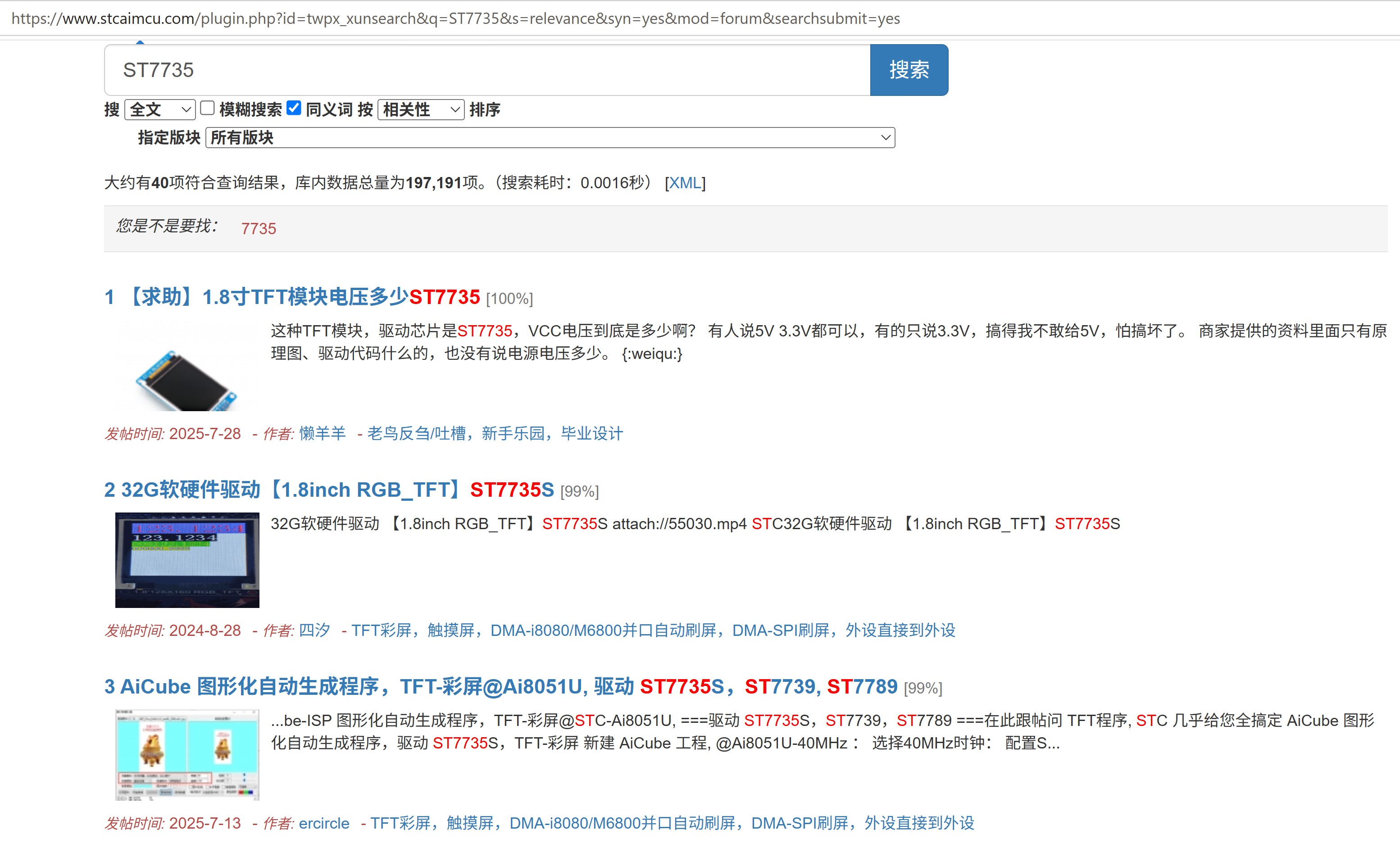
- 【求助】1.8寸TFT模块电压多少 ST7735
- 32G软硬件驱动【1.8inch RGB_TFT】ST7735S
- 我在用 AI8H8K64U搭配 BL0942读取交流电的电压电流,这个代码始终编译错误 (
⏱️ 查找用时 25.0s | 总回答用时 61.2s

 |手机版|深圳国芯人工智能有限公司
( 粤ICP备2022108929号-2 )
|手机版|深圳国芯人工智能有限公司
( 粤ICP备2022108929号-2 )
 发表于 2026-7-8 09:56:22