找回密码
 立即注册
查看: 37|回复: 11

冲哥的8051u学习

[复制链接]
  • 打卡等级:初来乍到
  • 打卡总天数:9
  • 最近打卡:2026-05-01 03:00:05
已绑定手机

2

主题

54

回帖

144

积分

注册会员

积分
144
发表于 4 天前 | 显示全部楼层 |阅读模式

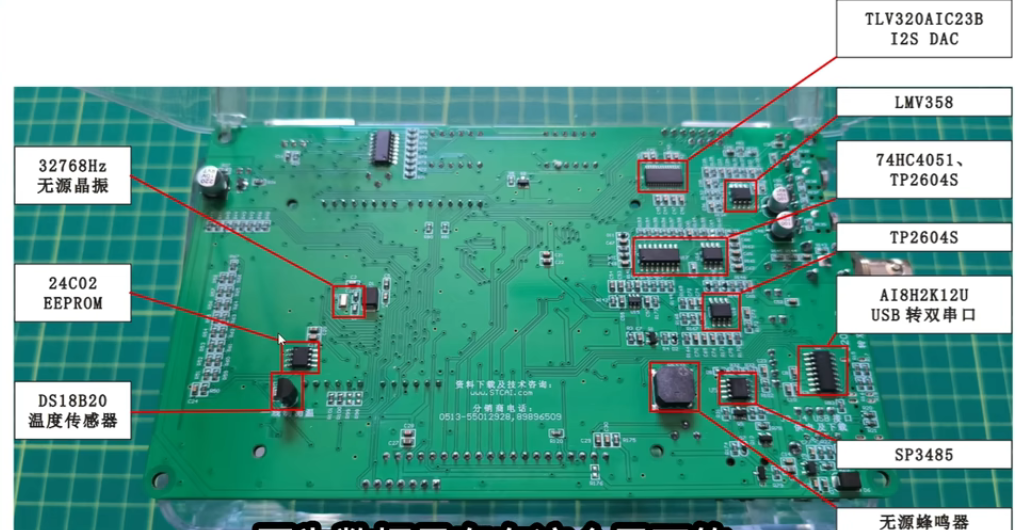
1 8051U 实验箱展示

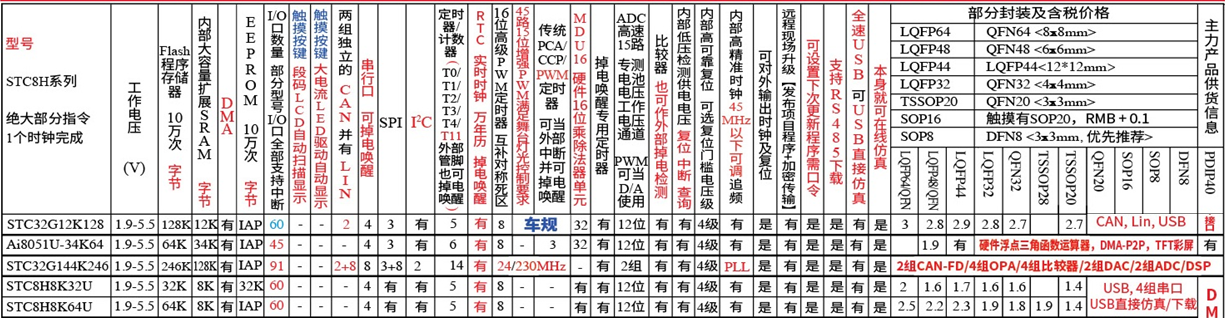
8051u面向消费电子,是32g的升级版本

image.png

优化了qspi,iis,pwm_dma,32硬件乘除单元

回复

使用道具 举报 送花

  • 打卡等级:初来乍到
  • 打卡总天数:9
  • 最近打卡:2026-05-01 03:00:05
已绑定手机

2

主题

54

回帖

144

积分

注册会员

积分
144
发表于 4 天前 | 显示全部楼层

image.png

image.png

8051u的实验箱的功能还是很丰富的,这个实验箱怎么没有can和lin呢,芯片砍掉了吗,估计是产品定位的问题吧,

库函数中发现有AI8051U_USART_LIN.h也就是串口实现的Lin,

image.png

keil开发环境与配置,中断支持插件

回复

使用道具 举报 送花

  • 打卡等级:初来乍到
  • 打卡总天数:9
  • 最近打卡:2026-05-01 03:00:05
已绑定手机

2

主题

54

回帖

144

积分

注册会员

积分
144
发表于 4 天前 | 显示全部楼层

3.创建工程和点灯

image.png

image.png

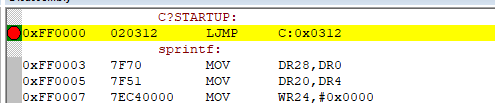
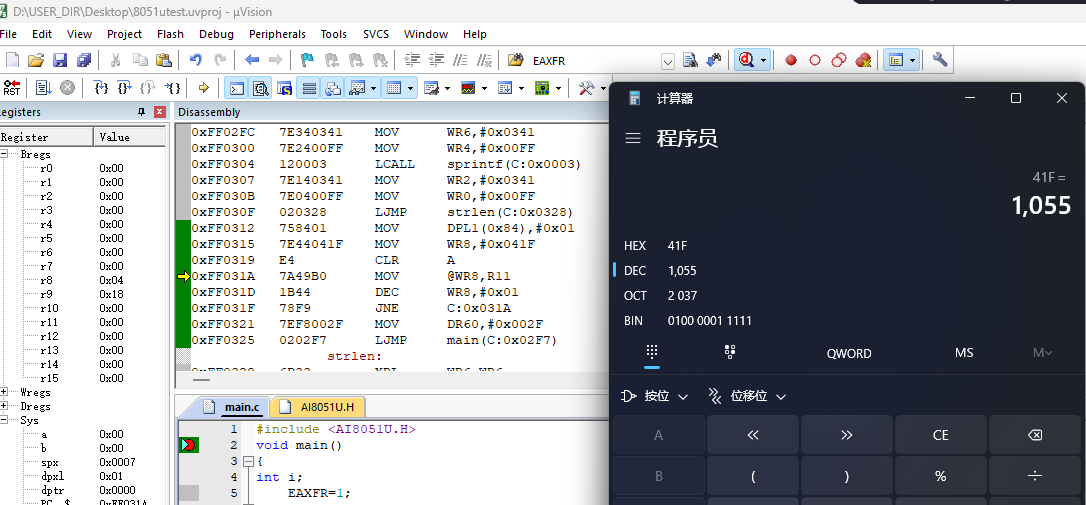
程序从ff:0000执行,复位中断-->ff:0312h

image.png

清零0x41f--0x0000这一片内存,然后跳到main.

这个操作应该是ai8051u里面这一段操作
image.png

回复

使用道具 举报 送花

  • 打卡等级:常住居民II
  • 打卡总天数:83
  • 最近打卡:2026-04-27 17:12:41

31

主题

97

回帖

988

积分

版主

积分
988
发表于 4 天前 | 显示全部楼层
要 做到 USB不停电下载
要 尝试 AiCube 图形化自动配置生成程序工具
推荐优先看的:  
printf_usb("Hello World !\r\n")
USB不停电下载, 演示视频链接:
https://www.stcaimcu.com/thread-19077-1-1.html

下载 最新的 AiCube-ISP-V6.96V-plus版 或以上版本软件 !

深圳国芯人工智能有限公司-工具软件

下载 最新的 USB库函数,永远用最新的 USB库函数 !
深圳国芯人工智能有限公司-库函数
下载 最新的 用户手册 !
下载 最新的 上机实践指导书 !

下载 最新的 Ai8051U 用户手册
https://www.stcaimcu.com/data/download/Datasheet/AI8051U.pdf

下载 最新的 Ai8051U 实验指导书,
AiCube 图形化自动配置生成程序工具使用说明
https://www.stcaimcu.com/data/do ... %AF%BC%E4%B9%A6.pdf

推荐优先看的 printf_usb("Hello World !\r\n")及usb不停电下载, 演示视频链接


回复

使用道具 举报 送花

  • 打卡等级:初来乍到
  • 打卡总天数:9
  • 最近打卡:2026-05-01 03:00:05
已绑定手机

2

主题

54

回帖

144

积分

注册会员

积分
144
发表于 4 天前 | 显示全部楼层
芯S*** 发表于 2026-4-27 17:12
要 做到 USB不停电下载;
要 尝试 AiCube 图形化自动配置生成程序工具;
推荐优先看的:  

谢谢提醒,正在学习这部分
回复

使用道具 举报 送花

  • 打卡等级:初来乍到
  • 打卡总天数:9
  • 最近打卡:2026-05-01 03:00:05
已绑定手机

2

主题

54

回帖

144

积分

注册会员

积分
144
发表于 4 天前 | 显示全部楼层

文字文稿3_01.png

回复

使用道具 举报 送花

  • 打卡等级:初来乍到
  • 打卡总天数:9
  • 最近打卡:2026-05-01 03:00:05
已绑定手机

2

主题

54

回帖

144

积分

注册会员

积分
144
发表于 4 天前 | 显示全部楼层

image.png

回复

使用道具 举报 送花

  • 打卡等级:初来乍到
  • 打卡总天数:9
  • 最近打卡:2026-05-01 03:00:05
已绑定手机

2

主题

54

回帖

144

积分

注册会员

积分
144
发表于 4 天前 | 显示全部楼层

按键消抖

bit scan_p32_key()
{

if (P32==0)
{
delay_ms(20);
if(P32==0)
while(!P32);
delay_ms(20);
return(1);
}
return 0;
}

#include "config.h"

void main()
{
int i;
EAXFR=1;
WTST = 0;
CKCON = 0;
P0_MODE_IO_PU(GPIO_Pin_All );
P3_MODE_IO_PU(GPIO_Pin_All );
P4_MODE_IO_PU(GPIO_Pin_0 );
usb_init();
//set_usb_ispcmd("@STCISP#");
EA=1;
//KEY_P32_init();
P40=0;
P32=1;
while(1){
// i++;
//delay_ms(500);
// P01=i%2;
//if(!bUsbInBusy){printf_usb("i:%d\r\n",i);}
//FLOW_Led();
// if(WakeUpSource==1){KEY_P32();}
// }
if(scan_p32_key())
{
printf("P32 is press down \r\n");
}

}}

回复

使用道具 举报 送花

  • 打卡等级:初来乍到
  • 打卡总天数:9
  • 最近打卡:2026-05-01 03:00:05
已绑定手机

2

主题

54

回帖

144

积分

注册会员

积分
144
发表于 4 天前 | 显示全部楼层

7 定时器

void systick_init(){
TIM_InitTypeDef T0;
T0.TIM_Mode=TIM_16BitAutoReload;
T0.TIM_ClkMode=TIM_CLOCK_1T;
T0.TIM_ClkSource=TIM_SOURCE_SYSCLK;
T0.TIM_ClkOut=DISABLE;
T0.TIM_Value=0x63c0;
T0.TIM_PS=0;
T0.TIM_Run=ENABLE;
Timer_Inilize(Timer0,&T0);
NVIC_Timer0_Init(ENABLE,Priority_3);

}

void Timer0_ISR_Handler (void) interrupt TMR0_VECTOR //进中断时已经清除标志
{
// TODO: 在此处添加用户代码

T0_cnt++;
if(T0_cnt%100==0)	P07 = ~P07;

}

void main()
{
u32 last_print_time = 0;

EAXFR=1;
WTST = 0;
CKCON = 0;
P0_MODE_IO_PU(GPIO_Pin_All);
P3_MODE_IO_PU(GPIO_Pin_All);
P4_MODE_IO_PU(GPIO_Pin_0);
usb_init();
systick_init(); 
//set_usb_ispcmd("@STCISP#"); 
EA=1;

//KEY_P32_init();
P40=0;
P32=1;

while(1){

if(T0_cnt % 1000 == 0 && T0_cnt != last_print_time) {
    printf("T0: %lu ms\r\n", T0_cnt);
    last_print_time = T0_cnt;
}

if(scan_p32_key()) {
    printf("P32 is press down at %lu ms\r\n", T0_cnt);
}

}}

回复

使用道具 举报 送花

  • 打卡等级:初来乍到
  • 打卡总天数:9
  • 最近打卡:2026-05-01 03:00:05
已绑定手机

2

主题

54

回帖

144

积分

注册会员

积分
144
发表于 3 天前 | 显示全部楼层

简单的任务调度

#ifndef USER_H
#define USER_H
#include "config.h"

typedef struct {
u8   run;
u16   cnt;
u16 rest_time;
void (*fn)(void);
} task;

void task_time_update();
void task_handle();
void FLOW_Led();
void KEY_P32_init();
void KEY_P32();
bit scan_p32_key();
void systick_init();
extern u32 T0_cnt;
#endif
#include "user.h"
// 全局变量定义
u32 T0_cnt = 0;  // Timer0 系统滴答计数器,每1ms递增一次


void task0(){
    static u8 i=0;
P00 = ~P00;
       printf("task0 cnt:%d  run.. \r\n",(int)i++);
}
void task1(){
     static u8 i=0;
P01 = ~P01;
       printf("task1 cnt:%d  run.. \r\n",(int)i++);
}
void task2(){
     static u8 i=0;
P02 = ~P02;
       printf("task2 cnt:%d  run.. \r\n",(int)i++);
}
void task3(){
     static u8 i=0;
P03 = ~P03;
       printf("task3 cnt:%d  run.. \r\n",(int)i++);
}
void task4(){
     static u8 i=0;
P04 = ~P04;
       printf("task4 cnt:%d  run.. \r\n",(int)i++);
}
void task5(){
     static u8 i=0;
P05 = ~P05;
       printf("task5 cnt:%d  run.. \r\n",(int)i++);
}
void task6(){
     static u8 i=0;
P06 = ~P06;
       printf("task6 cnt:%d  run.. \r\n",(int)i++);
}
void task7(){
     static u8 i=0;
P07 = ~P07;
       printf("task7 cnt:%d  run.. \r\n",(int)i++);
}

 task task_list []={
{0  , 0 , 1 ,task0},
{0  , 0 , 5 ,task1},
{0  , 0 , 10 ,task2},
//{0  , 0 , 30 ,task3},
//{0  , 0 , 40 ,task4},
//{0  , 0 , 50 ,task5},
//{0  , 0 , 60 ,task6},
//{0  , 0 , 70 ,task7},
};
u8 TASK_MAX=sizeof(task_list)/sizeof(task_list[0]);
void task_time_update(){
u8 i;
    for(i=0;i<TASK_MAX;i++){
        if(task_list[i].cnt>task_list[i].rest_time&&task_list[i].run==0)
            {task_list[i].run=1;
             task_list[i].cnt=0;
            }
        else
            {task_list[i].cnt+=1;}
    }

}

void task_handle(){
u8 i;
void (*fn)(void);   
    for(i=0;i<TASK_MAX;i++){
        if(task_list[i].run&&task_list[i].rest_time)
            {
                fn= task_list[i].fn;
                if(fn!=NULL)fn();
                task_list[i].run=0;
            }
    }
}

while(1){
task_handle();
delay_ms(500);

}}

回复

使用道具 举报 送花

您需要登录后才可以回帖 登录 | 立即注册

本版积分规则

QQ|手机版|深圳国芯人工智能有限公司 ( 粤ICP备2022108929号-2 )

GMT+8, 2026-5-1 10:29 , Processed in 0.135631 second(s), 103 queries .

Powered by Discuz! X3.5

© 2001-2026 Discuz! Team.

快速回复 返回顶部 返回列表